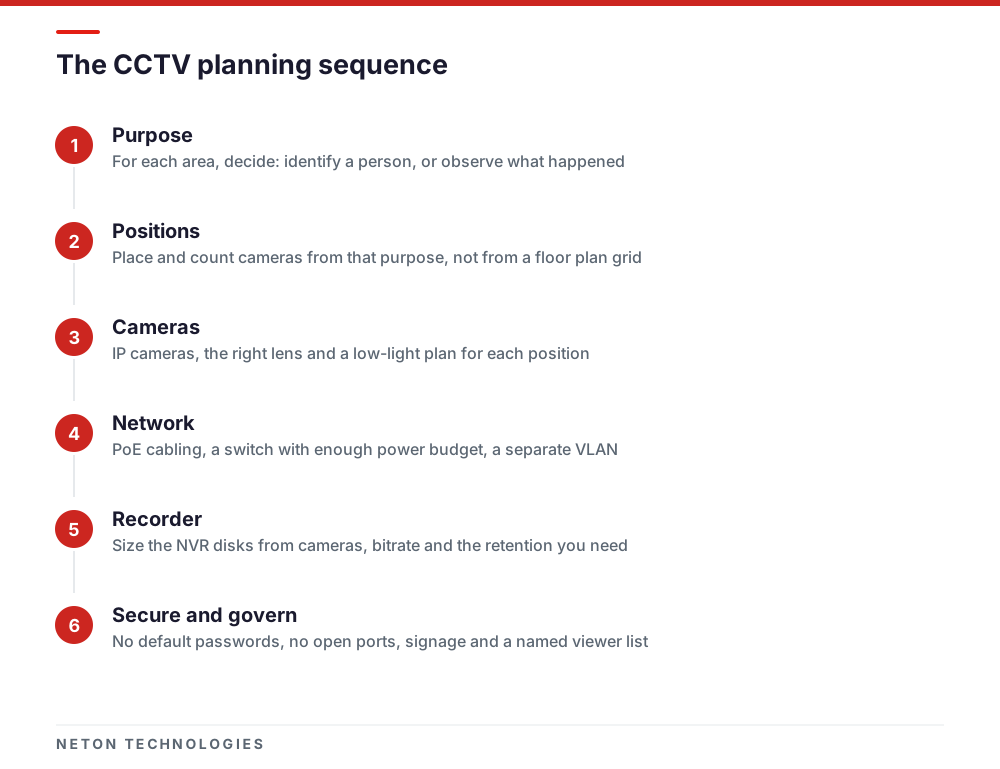
Decide what each camera must prove before you choose any hardware. Entrances and tills need cameras that can identify a face; open floors and car parks only need to show what happened. That decision sets the camera count, lenses, cabling, recorder size and retention, and it shapes how you secure remote viewing and handle footage as personal data.
Most small-business CCTV systems disappoint for one reason: nobody decided what each camera had to prove. The footage exists, but the face at the door is a blur, or the camera over the till shows the top of a head. Plan from the question each camera must answer, and the hardware choices follow.
Decide what each camera must show: identify or observe
Every camera position has one job, and there are two that matter for a small business. An identify camera must show a face clearly enough that a stranger could pick the person out. An observe camera only has to show what happened: someone walked into the stock room, a pallet was moved, a car left at 2 am.
The difference is measured in pixels on the subject. Axis, summarising the IEC 62676-4:2014 guidelines, gives 25 px/m for detection, 63 for observation, 125 for recognition and 250 for identification, and recommends aiming above the minimum because lighting, optics and compression all eat into it. IEC published a second edition of the guidelines in October 2025 with a revised set of levels, so ask your designer which edition the plan follows.
In practice this means identify cameras are close, narrow and placed where people must pass: doors, tills, the server room. Observe cameras are wide and cover space. A single camera rarely does both well.
Count cameras by area, not by floor plan grid
Walk the premises and list every point where you need to identify someone, then every space you need to observe. The table below shows the usual answer for each area of a small office, shop or warehouse.
Start with the identify positions, because they are not negotiable: one camera per entrance, per till and per sensitive door. Then add wide cameras until the shared areas are covered with no blind corners. Two rules keep the count honest:
- Plan for the space as it will be used. Racking, partitions and stock change what a camera can see. Plan positions against the fit-out drawings, not an empty shell.
- Cover shared areas, not people's desks. A camera pointed at one employee's screen all day is hard to justify and easy to complain about. Keep coverage to entrances, circulation, cash and stock.
If you are fitting out a new space, fold the camera plan into the wider sequence in our office move IT checklist, because each camera needs a cable run decided before the ceilings close.
IP or analogue, lenses and low light
For a new installation, choose IP cameras. Video and power share one network cable, resolution goes well beyond analogue, and adding a camera later means adding a switch port rather than a recorder channel. Analogue HD still makes sense when you are reusing sound coaxial cabling in an existing site.
Choose the lens from the job, not the resolution:
- Fixed wide lenses suit observe positions in rooms and corridors.
- Varifocal lenses let the installer narrow the view on site to reach identify density at a door or a gate.
- Higher resolution helps only if the pixels land on the subject. A 4K camera across a whole car park still may not identify anyone at the far end.
Low light is where cheap plans fail. Infrared gives a usable black-and-white image in the dark, but it can glare off glass and reflective surfaces. Full-colour night cameras, such as Hikvision's ColorVu range, use wide apertures and supplemental light to keep colour at night, which matters when a description of clothing or a car is the evidence. Bright glass entrances are the opposite problem: a person against a sunlit doorway turns into a silhouette unless the camera has strong wide dynamic range.
NETON installs Hikvision, Dahua, Tiandy and EZVIZ, and the choice between them depends on the site, the coverage each area needs and how the system will be viewed.
Cabling, PoE and switches
IP cameras and door readers take data and power through one cable using Power over Ethernet (PoE). That makes the cabling the part of the system you live with longest, so plan it as structured cabling: a run from each camera back to a switch, labelled at both ends, tested and documented.
Three things to check before the switch is ordered:
- PoE budget. Add up the rated power of every camera, including heaters, infrared and PTZ motors, and make sure the switch can supply all of them at once with headroom.
- Distance. Copper Ethernet runs have a length limit. Distant cameras in a warehouse or car park may need a local switch or a fibre link.
- Separation. Put cameras and the recorder on their own VLAN, so a compromised laptop on the office network cannot reach them, and they cannot reach it. Dahua's own guidance recommends isolating networks with VLANs where they have no need to talk.
Power the switch and recorder from a UPS. A system that goes dark in a power cut records nothing at the moment it is most likely to be needed.
Size the recorder from retention, not the other way round
A network video recorder (NVR) stores what every camera sends, so its size follows from three numbers: how many cameras, how much data each sends, and how many days you keep. Decide the retention first, then size the disks to fit.
- Retention. Keep footage long enough to cover the time it usually takes you to notice an incident, and no longer than you need. Some premises and sectors have their own requirements, so check the rules that apply to your premises with the relevant authority and your landlord rather than picking a number from a forum.
- Bitrate. Resolution, frame rate, scene activity and the codec all drive it. Newer codecs such as H.265 need less storage than H.264 for similar quality, and most current cameras support it.
- Recording mode. Continuous recording is the safest for evidence; motion-based recording saves disk but can miss slow or partial events.
Use disks rated for continuous surveillance recording, ask for RAID or a spare disk on larger recorders, and test that you can find and export an hour of footage from last week before you sign off the installation.
Remote viewing, done securely
Remote viewing is the feature owners want most and the one most often set up badly. A camera or recorder on the internet with its factory password is an open door. CISA's guidance to manufacturers exists because attackers routinely exploit static default passwords in connected devices.
- No default passwords. Set a strong, unique password at activation on every camera and the recorder. Hikvision publishes an NVR security guide covering activation and user roles.
- No open ports. Dahua advises turning off router port mapping and unused services such as UPnP. Use the manufacturer's app or a VPN for remote access instead.
- Firmware on a schedule. Keep recorder and camera firmware current; the same Dahua guidance asks owners to keep NVRs and cameras up to date with the latest security fixes.
- One account per viewer. Give each person their own login with only the rights they need, and remove it when they leave.
- Switch off what you do not use. The UK NCSC recommends that if you do not need to view a camera over the internet, you disable remote access.
They map onto the capabilities NIST sets as a baseline for connected devices, including logical access to interfaces, device configuration and software update. Treat the recorder like any other server on your network, and include it in your wider cybersecurity for UAE businesses.
Footage is personal data: privacy in the UAE
Footage of people who can be identified is personal data. The UAE Personal Data Protection Law, Federal Decree-Law No. 45 of 2021, defines personal data to expressly include a person's image, and the UAE Government describes it as requiring organisations to protect the personal data they hold. Free zones with their own data protection law, such as DIFC and ADGM, follow their own regime, so check which one applies to your licence.
What that means for a CCTV plan:
- Signage. Put clear notices at entrances so people know cameras are in use before they are recorded.
- Purpose and placement. Record for security, cover shared areas, and keep cameras out of washrooms, changing areas and prayer rooms.
- Who can view. Name the people who may watch live and recorded footage, and keep that list short.
- Export and sharing. Decide who can export a clip and to whom, and log each export.
- Retention. Delete footage automatically once the retention period ends.
Beyond data protection, Dubai regulates the security industry under Law No. 12 of 2016, and some types of premises and sectors carry specific CCTV requirements. Check with the relevant authority and your landlord which rules apply to your premises before the design is fixed. Building management may also have its own rules for cameras in shared corridors and car parks.
Integrate with access control
Cameras show who was there; access control proves who opened the door. Linking the two means every door event can be checked against footage from that moment, and a lost card or a leaver's access can be removed centrally. Ask for equipment that follows open standards: ONVIF lists separate profiles for video and for access control systems, which helps devices from different makers work together. Our CCTV and security systems page covers door entry, biometrics and time and attendance.
Maintain it, or it will quietly stop working
A CCTV system fails silently. A camera knocked out of alignment, a dirty dome or a full disk is discovered only on the day footage is needed. Build a short routine:
- Monthly: check every camera shows a live image and the recorder shows no disk errors.
- Quarterly: clean lenses and housings, which matters in Dubai's dust and humidity, and recheck views after any layout change.
- On every firmware release: review and apply updates to the recorder and cameras.
- Twice a year: restore a clip end to end and review the viewer list.
Write the system down: camera positions and purposes, IP addresses, the switch and VLAN, admin credentials in your password vault, and who to call. Our IT infrastructure team keeps this record for the systems it supports.
NETON designs, installs and supports CCTV and access control for small and medium businesses across the UAE, using Hikvision, Dahua, Tiandy and EZVIZ. Send us your floor plan and what each area needs to show, and we will help you plan the system around it.
What each area of a typical small business needs a camera to do
| Area | Camera must | Typical approach | Watch out for |
|---|---|---|---|
| Main entrance and reception | Identify everyone coming in | One camera per door at face height, narrow field of view, close to the doorway | Bright glass behind the subject; needs a camera with strong WDR |
| Tills, cash points and safes | Identify the person and see the transaction | One camera per till, mounted above and slightly in front | Do not capture card PIN pads or customer screens |
| Shop floor or open office | Observe movement and events | Wide-angle or turret cameras covering aisles and walkways | Desks of individual staff; keep coverage to shared areas |
| Stock room and warehouse | Observe, and identify at the loading door | Wide cameras over racking, one identify camera at the door | Racking that blocks the view once stock arrives |
| Server or comms room | Identify who entered | One camera covering the door and the rack | Pair it with access control so every entry is logged |
| Car park and perimeter | Observe, with number plates at the gate if needed | Varifocal or bullet cameras with a night-time plan | Headlight glare and dark corners; plate capture needs its own camera |
Frequently asked questions
How many CCTV cameras does a small office or shop need?
There is no fixed number. Count the doors, tills and other points where you need to identify a person, give each one its own camera, then add wide cameras until the shared areas are covered. A small office often needs fewer cameras than expected; a shop with several tills and a stock room usually needs more.
How long should we keep CCTV footage?
Long enough to cover the time it usually takes you to notice an incident, and no longer than you need. Some premises and sectors have their own requirements, so check the rules that apply to yours with the relevant authority and your landlord. The retention you settle on sets the disk size of the recorder.
Is CCTV footage personal data in the UAE?
Footage of people who can be identified is personal data under Federal Decree-Law No. 45 of 2021, whose definition of personal data includes a person's image. Free zones with their own data protection law, such as DIFC and ADGM, follow their own rules. Either way, limit who can view footage, secure the recorder and tell people that cameras are in use.
Can I watch my cameras on my phone safely?
Yes, if remote access goes through the manufacturer's app or a VPN rather than a port opened on your router. Use a strong unique password with multi-factor sign-in where it is offered, give each viewer their own account, and keep the recorder's firmware updated.
Should we buy IP or analogue cameras?
For a new installation, IP cameras are the default: higher resolution, power and video over one network cable, and easier expansion. Analogue HD can make sense when you are reusing sound coaxial cabling in an existing site. Either way, plan the recorder and the remote access security the same way.
Which camera brands does NETON install?
NETON supplies and installs Hikvision, Dahua, Tiandy and EZVIZ cameras and recorders for businesses in the UAE, and chooses between them based on the site, the coverage each area needs and how the system will be viewed. Send us your floor plan and we can talk through the options.
Sources
- Pixel density based on IEC 62676-4:2014 — Axis Communications — 2026-11
- IEC 62676-4:2025 Video surveillance systems for use in security applications - Part 4: Application guidelines — International Electrotechnical Commission — 2025-10
- What's ColorVu Technology? — Hikvision — 2026-11
- H.265: High efficiency video coding — ITU-T — 2026-11
- Secure by Design Alert: How Manufacturers Can Protect Customers by Eliminating Default Passwords — US Cybersecurity and Infrastructure Security Agency — 2023-12
- Best Practices — Dahua Technology — 2026-11
- Network Video Recorder Security Guide — Hikvision — 2026-11
- Smart security cameras: using them safely in your home — UK National Cyber Security Centre — 2026-11
- IoT Device Cybersecurity Capability Core Baseline (NISTIR 8259A) — US National Institute of Standards and Technology — 2020-05
- Data protection laws — The Official Portal of the UAE Government — 2026-11
- UAE issues landmark personal data protection law — Clyde & Co — 2021-11
- Law No. (12) of 2016 Regulating the Security Industry in the Emirate of Dubai — Dubai Legislation Portal — 2016
- ONVIF Profiles — ONVIF — 2026-11
Plan a CCTV system that shows what you need, and nothing you should not
Phone: +971 4 439 5754 | WhatsApp: +971 4 542 3229
Get a Free Consultation