Because chat and meetings licences do not include calls to the phone network. You need a Teams Phone licence for each calling user, plus a way to reach the network. Microsoft Calling Plans are not sold in the UAE, so the usual fix is Direct Routing: a certified SBC and an e& or du SIP trunk.
Teams calling and phone calling are two different things
Calls between Teams users work out of the box. They travel over the internet inside Microsoft 365, and most Microsoft 365 plans include them. Calls to a mobile, a landline or a customer's office are different: they leave Microsoft's network and enter the public switched telephone network (PSTN), and Teams needs two extra things before it will place them.
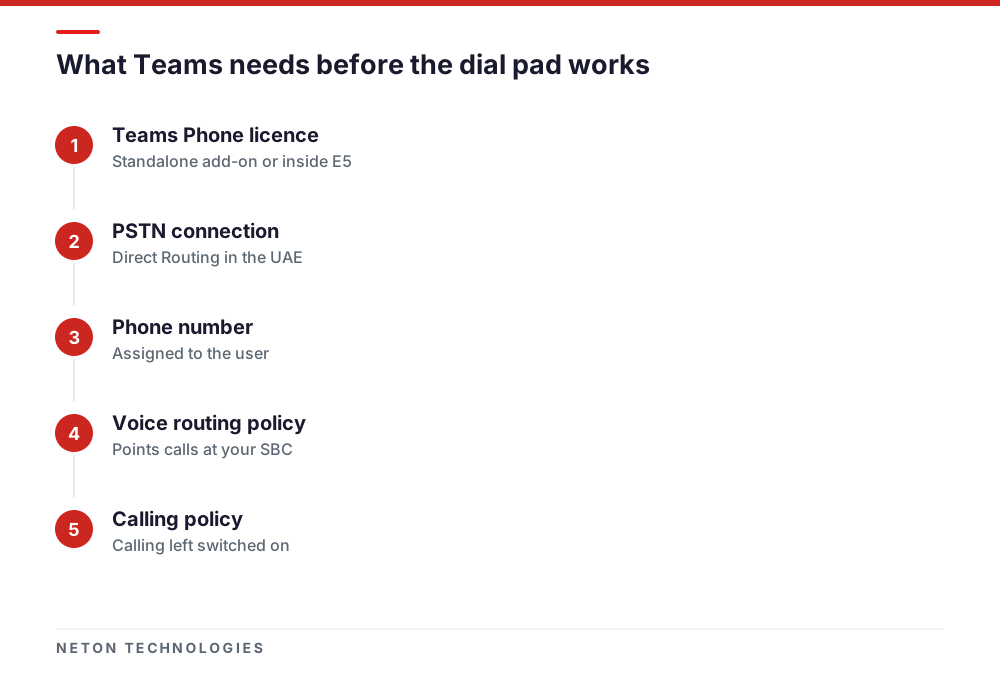
Microsoft states this plainly in its add-on licensing guide: Teams Phone requires a separate add-on licence, and for users to make and receive external calls you also need to choose a PSTN connectivity option. Until both are in place, Teams hides the dial pad, because there is nowhere for a dialled number to go.
So when someone in a UAE office says "Teams can't make phone calls", the question to ask is which of the two is missing. In most cases it is both.
The licence: Teams Phone is not in most Microsoft 365 plans
The licence that switches on calling features is Teams Phone Standard. Microsoft's Teams Phone licensing page lists the plans it can be added to: Microsoft 365 Business Basic, Business Standard and Business Premium, Teams Enterprise, Teams Essentials and the E3 and F-series suites, among others. Those plans are the prerequisite. They do not contain the Teams Phone capability themselves.
The exceptions are the E5 suites. Microsoft 365 E5 (no Teams) includes the Phone System application, so a user with E5 plus Teams Enterprise, or a legacy E5 licence that already includes Teams, does not need a separate Teams Phone Standard licence.
Two other licences cause confusion:
- Teams Phone with Calling Plan is a bundle of Teams Phone and a Microsoft Calling
Plan, with Microsoft as the carrier. It exists, but it depends on Calling Plans being sold where your users are, which in the UAE they are not.
- Audio Conferencing lets people dial in to Teams meetings by phone. Microsoft notes
it does not require a Teams Phone licence, and it does not give users a dial pad either.
You only need Teams Phone for the people who make or take external calls. Staff who chat and join meetings do not, which usually makes the licence count smaller than the headcount. Users who only call out occasionally can share one number through Shared Calling, but they still need Teams Phone, and the tenant still needs a carrier connection.
The connection: what Microsoft actually sells in the UAE
Microsoft documents several PSTN connectivity options, and which ones you can use depends on the country. We set out how the four Teams connection options compare in the UAE in a separate article; the short version for troubleshooting is below.
Calling Plans are not available. Microsoft's availability page for the United Arab Emirates answers "Calling Plans are available to purchase?" with "No", and lists no toll or toll-free service numbers for users either. The country and region list adds a detail that catches people out: availability is decided by the usage location on each user's licence, not by the billing address on the tenant. A tenant registered abroad does not make a Dubai user eligible.
Operator Connect depends on a local operator joining. Under Operator Connect, a Microsoft-certified operator provides the numbers and the calls, and you manage users from the Teams admin center. Microsoft's own prerequisite is that a certified operator is available in the country where you deploy. Check the Operator Connect directory for a UAE operator before planning around it, and ask e& or du directly. We could not confirm a listed UAE offering when this article was written.
Direct Routing works here. Direct Routing connects your own carrier trunk to Teams through a session border controller, so the carrier relationship stays local. That is why it is the normal answer for Microsoft Teams phone calls in the UAE.
The UAE fix: Direct Routing in brief
Microsoft's Direct Routing planning guide lists what it needs. In practical terms, three things:
- A Teams Phone licence for each calling user, as above.
- A certified session border controller. Microsoft supports Direct Routing only with
devices on its certified SBC list, and may decline support cases that involve anything else. The SBC needs a public IP address, a fully qualified domain name on a domain verified in your tenant, and a publicly trusted certificate. TE-SYSTEMS anynode is on that list, and we cover anynode as a software SBC separately.
- A carrier trunk. In the UAE that is
a licensed SIP trunk from e& or du, ordered against your trade licence. It is normally the longest lead-time item in the project, so order it first.
Users also have to be in Teams Only mode: Microsoft notes that Direct Routing is not supported in Islands mode. The full design, including resilience and emergency calling, is on our page about Teams Direct Routing in the UAE.
Licensed and connected, but still no dial pad
Once the licence and the connection exist, a missing dial pad usually means one of a few per-user settings is wrong or has not finished applying. Microsoft's voice troubleshooting module lists the causes. Work through them in this order.
No phone number assigned. A Direct Routing user needs a number in the Teams admin center, with the phone number type set to Direct Routing. Microsoft's guide to enabling Direct Routing users shows both the admin center steps and the PowerShell command, Set-CsPhoneNumberAssignment with -PhoneNumberType DirectRouting. Use the full international format, starting +971.
Enterprise Voice not enabled. Assigning a number online enables Enterprise Voice automatically. Users migrated from an on-premises Skype for Business server are the exception: if their number is still managed on-premises, Enterprise Voice has to be set online explicitly. Check with Get-CsOnlineUser and look at EnterpriseVoiceEnabled.
No voice routing policy, or a stale one. For Direct Routing, a voice routing policy connects the user to PSTN usages, voice routes and your SBC. If a user has only Teams Phone and no route matches the dialled number, Microsoft says the call is dropped. The troubleshooting module suggests removing the policy and granting it again to force an update, after which the dial pad should appear within four hours.
Calling switched off in the calling policy. In the calling policy, the Make private calls setting controls all calling in Teams. If it is off, the user loses calling entirely, not just the dial pad. A separate setting, Web PSTN calling, controls whether the browser version of Teams can call phone numbers.
Not signed out and back in. Policy changes take time to reach the client. After a fix, have the user sign out of Teams fully and sign in again before you assume it failed.
The checklist table at the end of this article maps each symptom to its usual cause. Work from the top: a fault higher up hides the ones below it.
Dial pad works, but some calls fail
When the dial pad appears but calls to certain numbers fail, the cause is usually routing rather than licensing. The common UAE cases:
- The number pattern does not match. Voice routes match on a pattern. A route written
only for one format will not catch numbers dialled another way, such as a local mobile dialled with a leading zero instead of +971. Dial plan normalisation rules fix this by converting what users type into one format before routing.
- The policy covers only some destinations. Microsoft's own examples show policies that
allow some number ranges and drop everything else. If international calls fail and local ones work, check whether an international PSTN usage is in the user's policy.
- The carrier rejects the caller ID. The SBC must present a number the trunk is allowed
to send. When outbound calls fail at the carrier, compare the presented number with the range on your e& or du account.
Microsoft also provides a self-diagnostic in the Microsoft 365 admin center that checks whether a user is configured correctly for Direct Routing. It is worth running before you open a support case.
What is different in the UAE
Three things make the UAE answer different from the one in most online guides.
Who may provide calls. The UAE regulator's FAQ states that licensees may provide VoIP services in the UAE, names e& (formerly Etisalat) and du as the licensees, and says third parties may do so only in collaboration with a licensee or with TDRA approval. This is why a phone number for Teams comes from a UAE carrier rather than from Microsoft or an overseas provider.
Which Microsoft options exist. Calling Plans are not sold here, and Operator Connect depends on a UAE operator taking part. That leaves Direct Routing as the dependable route, with your trunk from e&, which markets unified communications services to businesses, or from du.
Regional rollouts multiply the work. If you also have staff in Saudi Arabia, Oman or elsewhere in the Gulf, each country normally needs its own carrier arrangement behind the same tenant. Our article on local numbers across the GCC covers that pattern.
A sensible order of work
Most stalled Teams calling projects in the UAE stall in the same place: licences are bought, users wait, and the trunk has not been ordered. Work backwards from the trunk.
- Confirm which users need external calling, and license only them with Teams Phone.
- Order the SIP trunk from e& or du, and keep or move the numbers you already publish.
- Deploy and certify the SBC: domain, certificate, firewall rules and pairing with Teams.
- Build voice routes, PSTN usages, the voice routing policy and dial plan rules for UAE
number formats.
- Assign numbers and policies to a pilot group, test inbound, outbound and emergency
calls on the live trunk, then roll out.
Licences can be bought in an afternoon; the trunk and the SBC certificate cannot. Planning from those two items, rather than from the licence purchase, is what keeps a Teams calling rollout on its original date.
Checklist: symptom, likely cause and fix for Teams phone calls
| What you see | Likely cause | Fix |
|---|---|---|
| No dial pad for anyone, Teams-to-Teams calls work | No Teams Phone licence assigned | Assign Teams Phone Standard, or an E5 suite that includes it, to each calling user |
| Licence assigned, still no dial pad | No PSTN connection, or no phone number on the user | Connect Direct Routing, then assign a number with the phone number type set to Direct Routing |
| Number assigned, still no dial pad | Enterprise Voice off, or the voice routing policy not applied | Check EnterpriseVoiceEnabled, then remove and re-grant the voice routing policy |
| Calling missing entirely, even to colleagues | Calling policy has Make private calls turned off | Assign a calling policy with Make private calls switched on |
| Dial pad shows, calls to some numbers fail | Voice route number pattern does not match the dialled number | Correct the route pattern and the dial plan normalisation for UAE formats |
| Dial pad in the desktop app but not the browser | Web PSTN calling turned off in the calling policy | Turn Web PSTN calling on, or use the desktop or mobile app |
| Store bought a Calling Plan, numbers will not provision | Calling Plans are not sold for UAE-located users | Move to Direct Routing with a UAE carrier trunk |
Frequently asked questions
Why does Teams let me call colleagues but not mobile numbers?
Calls between Teams users run over the internet inside Microsoft 365 and need no phone licence. Calls to mobiles and landlines leave Microsoft's network and need a Teams Phone licence plus a connection to a carrier. Without both, Teams only shows calling to other Teams users.
Can I buy a Microsoft Calling Plan for our Dubai office?
No. Microsoft's own availability page for the United Arab Emirates states that Calling Plans are not available to purchase. The country is decided by the usage location on each user's licence, not by your billing address.
Is Microsoft 365 Business Premium enough to make phone calls?
No. Business Premium is a prerequisite for the Teams Phone Standard add-on, not a replacement for it. You add Teams Phone Standard to each user who needs to make external calls, then connect a carrier through Direct Routing.
We assigned the licence yesterday. How long until the dial pad appears?
Microsoft's training guidance says the dial pad should appear within four hours of forcing a policy update. If it is still missing after that, check that the user has a phone number, Enterprise Voice is enabled and a voice routing policy is assigned, then sign out of Teams and back in.
Do all our staff need a Teams Phone licence?
Only the people who make or take external calls. Staff who chat and join meetings do not need one. For users who only place occasional outbound calls, Microsoft's Shared Calling lets them use a shared number, but they still need a Teams Phone licence and the tenant still needs a carrier connection.
Can we keep our existing e& or du numbers on Teams?
Yes, with Direct Routing. The SBC connects your existing carrier trunk to Teams, so the numbers stay on the carrier account and are assigned to users in the Teams admin center. Nothing has to be ported to Microsoft.
Sources
- Microsoft Teams add-on licenses — Microsoft Learn — 2026-03
- Teams Phone licensing — Microsoft Learn — 2026-04
- Availability in the United Arab Emirates (UAE) — Microsoft Learn — 2026-08
- Country/region availability - Audio Conferencing, Calling Plans — Microsoft Learn — 2026-08
- PSTN connectivity options — Microsoft Learn — 2026
- Plan for Operator Connect — Microsoft Learn — 2026-08
- Operator Connect directory — Microsoft — 2026
- Plan Direct Routing — Microsoft Learn — 2026-09
- Session Border Controllers certified for Direct Routing — Microsoft Learn — 2026-09
- Enable users for Direct Routing — Microsoft Learn — 2026-08
- Configure call routing for Direct Routing — Microsoft Learn — 2026-09
- Configure calling policies in Microsoft Teams — Microsoft Learn — 2026-03
- Troubleshoot voice (training module) — Microsoft Learn — 2024-03
- Plan for Shared Calling — Microsoft Learn — 2026
- anynode and Microsoft Teams — TE-SYSTEMS — 2026
- Frequently asked questions — TDRA — 2026
- Unified Communications — e& UAE — 2026
Getting Microsoft Teams to make real phone calls in the UAE
Phone: +971 4 439 5754 | WhatsApp: +971 4 542 3229
Get a Free Consultation