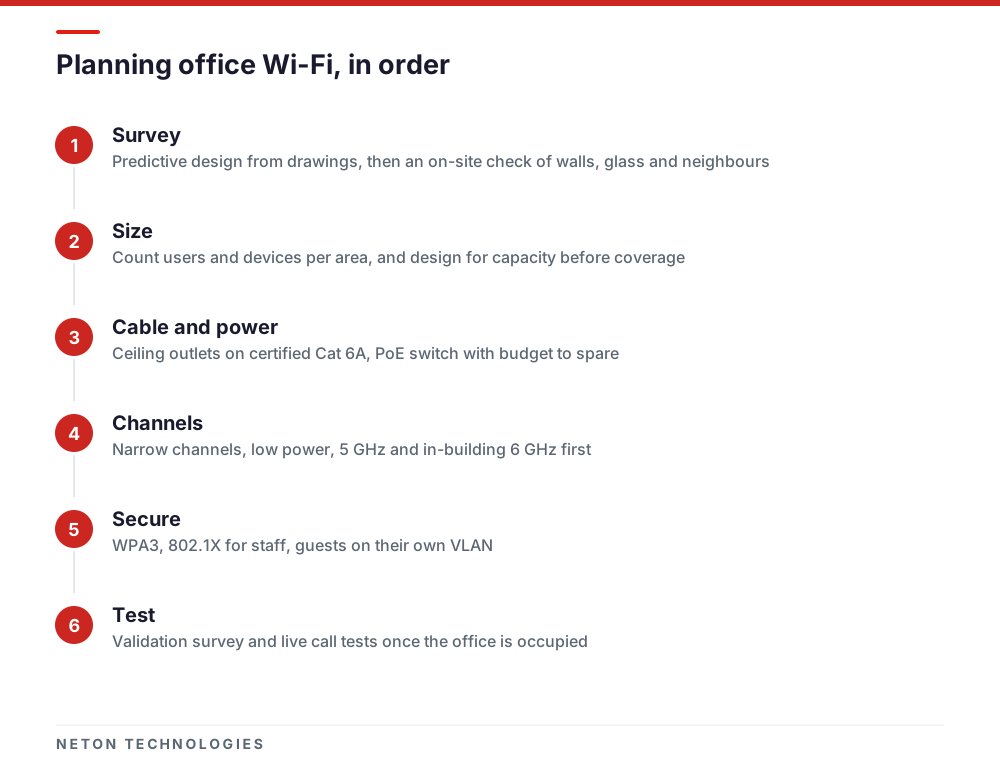
Start with a site survey, size the network for the number of devices rather than the floor area, and put ceiling-mounted access points on certified Cat 6A cabling from a PoE switch with enough power budget. Then separate guest traffic, use WPA3, tune for roaming calls, and test the finished network before you sign it off.
Office Wi-Fi in Dubai rarely fails because the signal is weak. It fails because too many devices share too few access points, the access points were placed from a floor plan, or the cabling and switch behind them were an afterthought. Plan it in the order below and each step removes a known cause.
1. Start with a survey: predictive first, then on site
A predictive survey models the office from the architect's drawings: you mark the walls, glass and cores, and planning software proposes access point positions. It is quick and cheap to change, and it tells the fit-out contractor where the ceiling outlets go.
It cannot see what is actually there. Cisco Meraki says an onsite survey is always recommended, because many variables affect how radio signals travel, and advises keeping access points away from metal and concrete walls that attenuate them heavily. In a Dubai tower that means the core, lift shafts, glass partitions with metallic coatings, and the networks of every tenant above and below you.
So use both: a predictive design to fix cabling positions during the fit-out, then an on-site check before the ceilings close, and a validation survey after installation.
2. Design for capacity, not coverage
The question "how many access points does an office need?" has a counting answer, not an area answer. Meraki's high-density guidance says that calculating the number of access points needed to meet a site's bandwidth needs is the recommended way to start, and plans for around 25 clients per radio, or 50 per access point, in dense areas.
To get your own number:
- Count devices, not people. Most staff carry a laptop and a phone, and many add a tablet or a watch. Add meeting-room screens, printers and any sensors on Wi-Fi.
- Estimate throughput per device. The same guide suggests taking about half of a device's advertised data rate, then reducing it by a further 30%, to get a realistic figure.
- Take the higher result. Work out access points needed for throughput and for client count, and use whichever is larger.
- Plan the busy rooms separately. A boardroom, training room or open-plan desk cluster needs its own count.
One constraint catches people out: adding access points on the same channel with overlapping coverage does not increase capacity. More access points only help if the channel plan gives them room.
3. Choose the Wi-Fi generation: 6, 6E or 7
Wi-Fi 6 added OFDMA, multi-user MIMO and target wake time, which let one access point serve many devices more efficiently. Wi-Fi 6E is Wi-Fi 6 extended into the 6 GHz band. Wi-Fi 7, introduced in 2024, adds multi-link operation across bands, 4K QAM and 320 MHz channels in the 6 GHz band.
For an office, the useful parts of Wi-Fi 7 are multi-link operation and the extra clean spectrum, not the headline speed. Wide channels reduce the number of channels you can reuse, which is why Meraki recommends 20 MHz channels in high-density environments. Buy access points for the devices you will run over the next few years, and check how many of your laptops support 6 GHz before paying for it.
4. What the UAE permits: the 6 GHz band and TDRA
This is the part global vendor guides do not cover. TDRA's Regulations for Ultra-Wide Band and Short Range Devices, Version 5.0, dated 30 October 2023, set the limits for Wi-Fi (listed as Wireless Access Systems) in the UAE:
- 6 GHz is allowed indoors only, and only the lower part. The regulation lists 5945-6425 MHz for in-building use at up to 200 mW e.i.r.p. Nothing above 6425 MHz is listed for Wi-Fi.
- The rule has moved since 2020. TDRA's 2020 announcement opened 5925-6425 MHz at 250 mW; the 2023 regulation is the current text, so design to it.
- Use is under class authorisation. The regulation permits these devices under class authorisation, on a non-interference and non-protection basis.
- Equipment must be approved. Telecom and wireless equipment must be registered with TDRA before it can be used, sold or distributed in the UAE, so buy through local channels and set the controller's country code to the UAE.
The practical result: you get fewer 6 GHz channels than in markets that opened the whole band, and room for at most one 320 MHz channel. Treat 6 GHz as extra capacity for capable devices, with 5 GHz still doing most of the work.
5. Ceiling-mounted access points on PoE and certified cabling
Access points belong on the ceiling, in open areas, not hidden above a metal tile or inside a cupboard. Each one needs a cable back to the comms room, and that cable carries its power.
- Cabling. Run Cat 6A to every access point position. Have every link tested to the ANSI/TIA-568 family, as Fluke Networks describes for Category 6A field testing, and keep the results.
- Power per port. PoE+ (802.3at) supplies up to 30 W at the switch and 25.5 W at the device; 802.3bt Type 3 supplies 60 W and 51 W. The same guide notes that tri-band Wi-Fi 7 access points often need 802.3bt.
- Power budget. A switch's PoE budget is shared across all ports. Add up the access points, phones and cameras on each switch, check the total against the budget, and leave headroom.
- Spare outlets. Pull a spare cable to busy areas while the ceiling is open. Adding one later costs far more.
Our structured cabling team designs, installs, tests and certifies Cat 6, Cat 6A and fibre, so the Wi-Fi design and the cabling come from the same drawings.
6. Channel planning and interference in towers
In an office tower you share the air with every tenant around you. Microsoft's Teams guidance says that access points on the same channel too close together compete, and that neighbouring access points should use channels that do not overlap.
- Prefer 5 GHz and 6 GHz. Meraki recommends 5 GHz for voice because of its lower noise floor, and notes 2.4 GHz has only 3 non-overlapping channels.
- Turn power down. Lower transmit power means smaller cells and more channel reuse.
- Expect radar rules. Parts of the 5 GHz band need dynamic frequency selection under the TDRA regulation, so access points may change channel on their own.
- Keep SSIDs few. Meraki puts the maximum recommended number of SSIDs at 3, because each one adds overhead on every channel.
7. Security: WPA3, 802.1X and a separate guest network
The Wi-Fi Alliance states that WPA3 is mandatory for Wi-Fi CERTIFIED devices, and WPA2 is not permitted in 6 GHz operation. If you want 6 GHz, you need WPA3.
- Staff. Use WPA3-Enterprise with 802.1X, so each user or device authenticates against a RADIUS server rather than sharing one password.
- Guests. NIST recommends logically separated WLANs for guest and internal use, with devices on one unable to reach the other. Put guests on their own VLAN with internet-only access, and use Enhanced Open or WPA3 for encryption.
- Devices that cannot do either. Put printers and IoT devices on their own VLAN, too, with access only to what they need.
NIST also recommends a WLAN security assessment at least annually. Our cybersecurity for Dubai businesses page covers the wider picture.
8. Roaming for voice and Teams calls
A laptop on a Teams call moving from desk to meeting room has to change access point without a gap. Meraki's voice guidance designs for -67 dBm or better and a signal-to-noise ratio of 25 dB or more everywhere calls are made, and says fast roaming on an 802.1X network can cut roaming time from 400-500 ms to under 100 ms.
- 802.11k gives the client a list of neighbouring access points, so it decides faster where to go.
- 802.11r lets the client skip full re-authentication on each roam. Test it with your actual devices, as some older clients have trouble with it.
- QoS. Microsoft recommends QoS or WMM so media traffic is prioritised, plus band steering towards 5 GHz.
If Teams is also your phone system, read our guide to Microsoft Teams phone calls in the UAE.
9. Controller or cloud management
Every multi-access-point network needs central management for channels, power, roaming keys and firmware. The choice is architectural:
- Cloud-managed. Access points are configured from a web dashboard. Little to maintain on site, suits single offices and branches.
- On-premises controller. A hardware or virtual controller in your comms room. More control, more to patch and back up.
- Standalone. Each access point managed on its own. Acceptable for two or three, unmanageable beyond that.
Whichever you pick, it should report client counts, channel use and failed connections, so problems show up before users complain.
10. Test after installation, and again once the office is full
Run a validation survey across the whole floor against your design targets. Then test under real load: a full meeting room, a call walking from one end of the floor to the other, guest access blocked from internal systems. Repeat after furniture and people arrive, because both absorb signal. Keep the survey report, cable test results and configuration as part of your handover pack.
Our IT infrastructure team builds office networks end to end, and our IT support engineers in Dubai keep them running.
What is different in the UAE
- 6 GHz is narrower here. TDRA permits 5945-6425 MHz indoors only; plan 6 GHz as a supplement.
- Equipment needs TDRA approval. Buy through local channels and set the UAE country code.
- Towers are crowded. Neighbouring tenants share your channels, so on-site survey data matters more than in a standalone building.
NETON designs, installs and supports office networks and cabling for projects in the UAE. Send us your floor plan, headcount and move-in date, and we will help you plan the Wi-Fi around them.
Wi-Fi bands in the UAE: what TDRA permits and what each band is good for in an office
| Band | TDRA limit (SRD Regulations v5.0) | Good for | Watch out for |
|---|---|---|---|
| 2.4 GHz (2400-2483.5 MHz) | 100 mW e.i.r.p. | Older devices, printers, IoT sensors | Few non-overlapping channels, crowded by neighbouring networks |
| 5 GHz (5150-5350 and 5470-5725 MHz) | 100 mW to 1 W e.i.r.p. depending on sub-band, TPC and DFS | Laptops, phones and calls: the main office band | Radar detection (DFS) can move APs off some channels |
| 6 GHz (5945-6425 MHz) | 200 mW e.i.r.p., in-building only | Wi-Fi 6E and Wi-Fi 7 clients in dense areas | Lower band only in the UAE; WPA3 required; not every laptop supports it |
| 6425-7125 MHz | Not listed for Wi-Fi in the regulation | Nothing in an office today | Equipment advertising full-band 6 GHz will not use this range here |
Frequently asked questions
How many access points does an office need?
Count devices, not square metres. Cisco Meraki's high-density guidance plans for around 25 clients per radio, or 50 per access point, and says to take whichever is higher of the throughput-based and client-based counts. A survey then adds access points where walls or glass leave gaps in coverage.
Can I use Wi-Fi 6E or Wi-Fi 7 in the UAE?
Yes, indoors. TDRA's Short Range Devices regulations permit Wi-Fi in 5945-6425 MHz inside buildings at up to 200 mW e.i.r.p. The upper part of the 6 GHz band is not included, so you get fewer 6 GHz channels than in some other countries.
Is a predictive survey enough, or do I need someone on site?
A predictive design from the floor plan is a good starting point and fixes where the ceiling outlets go. It cannot see the actual building materials or the networks next door, so an on-site check before installation and a validation survey afterwards are still needed.
Should guests be on a separate Wi-Fi network?
Yes. NIST recommends logically separate WLANs for guest and internal use, with devices on one unable to reach the other. In practice that means a guest SSID on its own VLAN with internet-only access, ideally with Enhanced Open or WPA3 encryption.
Why do Teams calls drop when I walk around the office?
Usually the next access point is too weak, the laptop holds on to the old one too long, or the network makes it re-authenticate fully on every move. Designing for strong 5 GHz overlap, enabling 802.11k and 802.11r where your clients support them, and prioritising voice traffic with WMM fixes most of it.
Can NETON design and install our office Wi-Fi?
NETON designs, installs, tests and certifies structured cabling in Cat 6, Cat 6A and fibre, and builds and supports office networks for projects in the UAE. Dubai-based engineers handle ongoing support. Send us your floor plan and headcount to start.
Sources
- TDRA Regulations for Ultra-Wide Band and Short Range Devices, Version 5.0 — Telecommunications and Digital Government Regulatory Authority (TDRA) — 2023-10
- The TRA adds additional 500 MHz of 6 GHz band for the Wi-Fi radio frequency spectrum — TDRA — 2020-12
- TDRA Type Approval for Telecommunication Apparatus in the UAE — TÜV Rheinland — 2026-11
- Wi-Fi CERTIFIED 6 — Wi-Fi Alliance — 2026-11
- Wi-Fi CERTIFIED 7 — Wi-Fi Alliance — 2026-11
- Security — Wi-Fi Alliance — 2026-11
- Conducting Site Surveys with MR Access Points — Cisco Meraki — 2026-11
- High Density Wi-Fi Deployments — Cisco Meraki — 2026-11
- Wireless VoIP QoS Best Practices — Cisco Meraki — 2026-11
- 802.11k and 802.11r Overview — Cisco Meraki — 2026-11
- WPA3 Encryption and Configuration Guide — Cisco Meraki — 2026-11
- Prepare your organization's network for Teams — Microsoft Learn — 2026-10
- Guidelines for Securing Wireless Local Area Networks (SP 800-153) — US National Institute of Standards and Technology (NIST) — 2012-02
- PoE vs PoE+ vs PoE++: Power over Ethernet standards — TP-Link — 2026-11
- ANSI/TIA Category 6A field testing requirements for Modular Plug Terminated Links — Fluke Networks — 2026-11
Plan your office Wi-Fi with the cabling and network behind it
Phone: +971 4 439 5754 | WhatsApp: +971 4 542 3229
Get a Free Consultation