Check every Windows 10 PC you own this week. Commercial ESU Year 1 coverage ended on 13 October 2026, so a PC without a Year 2 licence has received no security updates since. Buy and activate Year 2, which runs to 12 October 2027, only for PCs you must keep, and use that year to move the rest to Windows 11.
What actually ended on 13 October 2026
Free support for Windows 10 ended on 14 October 2025. Since then, the only way for a business PC on Windows 10 to receive security fixes has been the paid Extended Security Updates (ESU) programme, which delivers critical and important security updates and nothing else.
ESU is sold in yearly blocks. Microsoft's partner documentation lists the commercial coverage dates:
- Year 1: 15 October 2025 to 13 October 2026
- Year 2: 14 October 2026 to 12 October 2027
- Year 3: 13 October 2027 to 10 October 2028
So if your business bought Year 1 and nothing more, those PCs fell out of coverage last month. Three years is the maximum for organisations, and Microsoft states that the price doubles every consecutive year. Year 2 is a bridge, not a destination.
Step 1: Find out which PCs are covered today
Start with a list, not a purchase. For every Windows 10 PC, record the edition, the version, who uses it and what it runs. ESU only applies to Windows 10 version 22H2, and Long Term Servicing editions (LTSB and LTSC) are not covered by the programme because they follow their own lifecycles.
Then check each PC's ESU status. Each ESU year has its own activation ID, and running slmgr.vbs /dlv from an elevated command prompt shows which ESU programme is licensed on that device. A PC that shows Year 1 but not Year 2 is unpatched now.
Two traps catch businesses here:
- The consumer programme does not apply to you. Microsoft's consumer ESU runs to 12 October 2027, but it "can't be used in commercial scenarios" and excludes PCs joined to Active Directory or Microsoft Entra, or enrolled in device management.
- Reimaged PCs need activating again. A PC rebuilt since it was activated needs the key installed again, and Microsoft documents how to add activations to an ESU key for reimaging.
If you manage PCs with Microsoft Intune, the inventory is quicker. If nobody manages them centrally, that is the first thing to fix; our page on IT support for SMEs in Dubai covers what managed devices look like day to day.
Step 2: Decide what happens to each PC
Sort every Windows 10 PC into one of three groups.
Upgrade. The PC meets the Windows 11 requirements: a compatible 64-bit processor with two or more cores, 4 GB of memory, 64 GB of storage, UEFI firmware capable of Secure Boot, and TPM version 2.0. To upgrade directly, the PC must be on Windows 10 version 2004 or later.
Replace. The PC fails the hardware check, usually because of its processor or TPM, or it is old enough that new hardware makes more sense than an upgrade.
Cover with Year 2. The PC must stay on Windows 10 for a reason you can name: an application that is not yet certified for Windows 11, a device driver for lab or production equipment, or a replacement that cannot arrive in time. Write the reason and the exit date next to the PC.
To check eligibility, Microsoft's PC Health Check app shows whether a PC meets the minimum requirements and why. Microsoft's Windows 11 planning guide notes that Enterprise and Education editions should rely on their IT administrators to confirm eligibility, and points organisations to their existing management tools. Before you replace a PC, check the firmware: TPM and Secure Boot are sometimes present but switched off.
Step 3: Enrol the PCs that must stay in Year 2
ESU is cumulative. Microsoft says that if you join in Year 2, you pay for Year 1 too, and it must be bought by the full year, with a minimum of one licence. Businesses buy commercial ESU through volume licensing or from a Microsoft CSP partner, and Microsoft tells CSP partners to buy both Year 1 and Year 2 for customers joining now.
Once bought, the key appears in the Microsoft 365 admin center as a Multiple Activation Key. Enabling it on each PC needs:
- Windows 10 22H2 with KB5066791 or a later update installed.
- The ESU Licensing Preparation Package, KB5072653, installed after it.
- The key installed and activated against the Year 2 activation ID.
- A check with
slmgr.vbs /dlvthat the PC shows as licensed.
Remember what ESU leaves out. There are no new features, no non-security fixes and no general technical support; Microsoft supports only activation, installation and regressions caused by ESU itself.
Where Windows 365 and Azure Virtual Desktop fit
Microsoft treats cloud desktops differently. ESU is included at no additional cost for Windows 10 virtual machines in Windows 365, Azure Virtual Desktop and Azure virtual machines, with no keys needed.
The more useful detail is the entitlement for the PCs on users' desks. A Windows 10 PC used to reach a Windows 365 Cloud PC is entitled to ESU if the user has a Windows 365 Enterprise licence, or a Windows 365 Flex Cloud PC in dedicated mode, and:
- the PC is Microsoft Entra joined or Entra hybrid joined;
- the user signs in to it with the same account at least once every 22 days;
- IT deploys a policy that turns on the ESU subscription check, through Intune or another device management tool.
That lets users work on Windows 11 in the cloud straight away while you replace their hardware on your own timetable. It suits teams already on Microsoft 365 and Entra ID. Our cloud computing page covers how NETON approaches cloud desktops and services.
Microsoft 365 Apps on Windows 10
Office is on a separate timetable. Microsoft will provide security updates for Microsoft 365 Apps on Windows 10 until 10 October 2028, but those devices stay on Version 2608 and receive no further feature updates. If a problem appears only on Windows 10, Microsoft support will ask you to move to Windows 11.
Patching Word and Outlook does not patch the operating system. A Windows 10 PC with current Office and no ESU is still exposed.
What happens to a PC with no updates at all
It keeps working. Microsoft is clear that a Windows 10 PC will still function, but it is at greater risk from viruses and malware, and each vulnerability found from now on stays open. That PC still opens email, browses the web and reaches your file shares, so one compromise can spread.
Endpoint security such as ESET reduces the risk, but it does not replace operating system patches. If an unpatched PC must stay for a few weeks, take it off general use, keep it away from sensitive data, and make sure your backup and data protection would let you recover cleanly.
A migration plan you can finish before October 2027
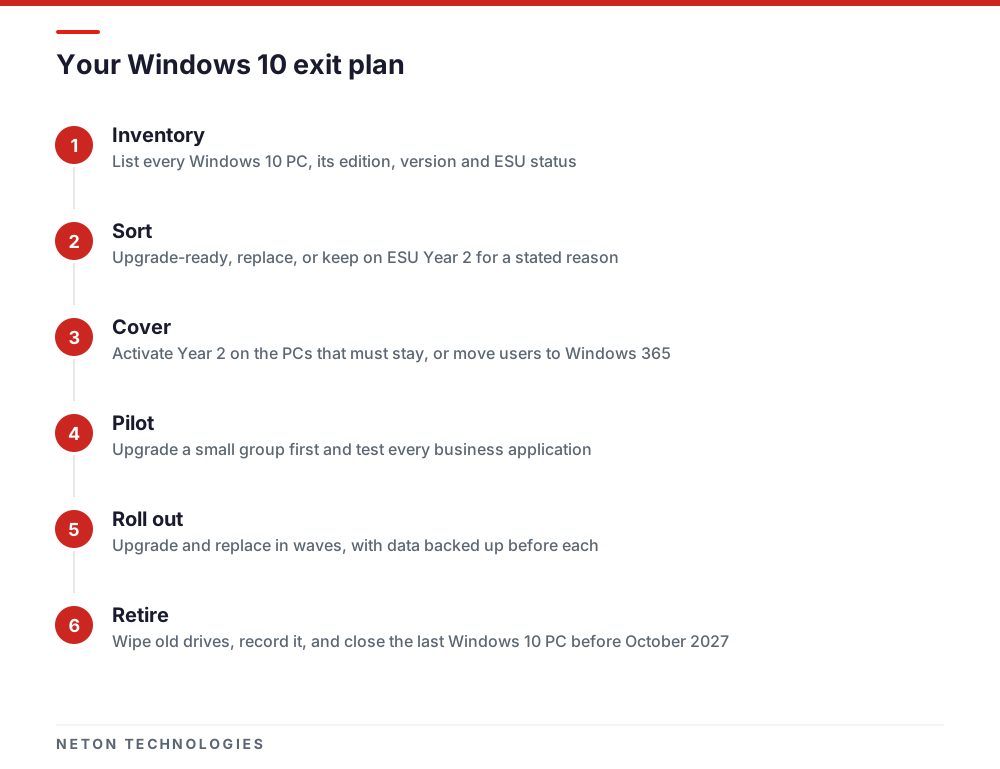
- Inventory now. Every Windows 10 PC, its edition, version, user, applications and ESU status.
- Close the gap this month. Activate Year 2 on PCs that must stay, or move their users to Windows 365.
- Pilot Windows 11. Upgrade a small group that uses each business application, and fix what breaks.
- Order replacements early. PCs that fail the hardware check need lead time for ordering, set-up and data transfer.
- Roll out in waves. Back up user data before each wave, and sync Desktop and Documents to OneDrive so a failed upgrade does not lose work.
- Retire old hardware properly. Wipe or destroy drives, record it, and update your asset list.
- Set a last date. Aim to have no Windows 10 PC left by 12 October 2027, so Year 3 is never needed.
What is different in the UAE
- The national cyber authority urges patching. The UAE Cybersecurity Council has said that most attacks exploit previously identified vulnerabilities that timely updates could have prevented. An unpatched Windows 10 PC is exactly that case.
- Personal data carries obligations. Federal Decree-Law No. 45 of 2021 requires organisations holding personal data to protect it. Some free zones, such as DIFC, have their own data protection rules, so confirm which apply to you.
- Dates are published in US time. Microsoft states its lifecycle dates in Pacific Time, which is behind the UAE. Do not plan to activate anything on the last day.
- Buy through a local CSP. Commercial ESU, Windows 365 and Microsoft 365 can all be bought through a Microsoft CSP partner, which keeps licences, billing and support in one place.
NETON is a Microsoft CSP partner in Dubai and handles every step above for businesses in the UAE, from ESU licences and Windows 11 upgrades to replacement PCs, cybersecurity for UAE businesses and the wider IT infrastructure behind them. Send us your list of Windows 10 PCs and we will help you decide which to upgrade, replace or cover.
Your options for a Windows 10 PC after ESU Year 1
| Option | What you get | Good fit when | Watch out for |
|---|---|---|---|
| Upgrade in place to Windows 11 | Full support and monthly updates on the same hardware | The PC meets the Windows 11 requirements, including TPM 2.0 and Secure Boot | Test line-of-business apps and drivers before upgrading the whole office |
| Replace with a new Windows 11 PC | New hardware with a supported operating system | The PC fails the hardware check or is near the end of its working life | Lead time for ordering, set-up and moving user data |
| Buy ESU Year 2 and keep Windows 10 | Critical and important security updates until 12 October 2027 | An application or device genuinely cannot move yet | Cumulative: Year 1 must be bought too; no new features, no general technical support |
| Move users to Windows 365 Cloud PCs | Windows 11 in the cloud, plus ESU for eligible Windows 10 devices used to connect | You want Windows 11 for users before you can replace their PCs | Devices must be Entra joined or hybrid joined, and the entitlement needs an Intune or MDM policy |
| Do nothing | No security updates at all | Never, for a PC that touches email, the internet or company data | Every vulnerability found from now on stays open on that PC |
Frequently asked questions
Did Windows 10 support end again in October 2026?
Free support for Windows 10 ended on 14 October 2025. What ended on 13 October 2026 was Year 1 of the paid Extended Security Updates programme for businesses. PCs with only a Year 1 licence stopped being covered on that date, and Year 2 covers 14 October 2026 to 12 October 2027.
Can my company use the free consumer ESU instead?
No. Microsoft says the consumer ESU programme cannot be used in commercial scenarios, and it excludes PCs joined to an Active Directory domain, joined to Microsoft Entra or enrolled in mobile device management. Business PCs need commercial ESU licences, bought through volume licensing or a Microsoft CSP partner.
We skipped Year 1. Can we just buy Year 2?
No. Microsoft states that ESU is cumulative, so a business that joins in Year 2 must also pay for Year 1. Year 2 can only be bought for a full year; partial periods are not sold. Weigh that against upgrading or replacing the PC.
Will Microsoft 365 Apps keep working on Windows 10?
Yes, but on reduced terms. Microsoft will keep issuing security updates for Microsoft 365 Apps on Windows 10 until 10 October 2028, but those devices stay on Version 2608 with no further feature updates, and support cases may be limited to troubleshooting. Patching Office does not patch the operating system underneath it.
How do I know if a PC can run Windows 11?
Run Microsoft's PC Health Check app on Windows 10 Pro, or use your management tools for a whole fleet. The usual blockers are a missing or disabled TPM 2.0, Secure Boot switched off, or a processor not on Microsoft's supported list. Some PCs pass after a firmware setting change, so check before you replace.
Can NETON help us move off Windows 10?
Yes. NETON is a Microsoft CSP partner in Dubai and supplies ESU licences, Windows 11 upgrades, replacement PCs, Microsoft 365 and IT support for businesses in the UAE. Send us a list of your Windows 10 PCs and we will help you sort them into upgrade, replace and cover.
Sources
- Extended Security Updates (ESU) program for Windows 10 — Microsoft Learn — 2025-11
- Purchasing Extended Security Update Licenses as a Cloud Solution Provider — Microsoft Learn — 2025-10
- Enable Windows 10 Extended Security Updates (ESU) — Microsoft Learn — 2026-04
- Enable Windows 10 ESU for clients accessing cloud and virtual machines — Microsoft Learn — 2026-05
- Windows 10 Consumer Extended Security Updates (ESU) program — Microsoft — 2026-11
- Windows 10 support has ended on October 14, 2025 — Microsoft Support — 2026-11
- Windows 10 Enterprise and Education lifecycle — Microsoft Learn — 2024-11
- Windows 11 requirements — Microsoft Learn — 2026-07
- Plan for Windows 11 — Microsoft Learn — 2025-12
- How to use the PC Health Check app — Microsoft Support — 2026-11
- Windows 10 end of support and Microsoft 365 Apps — Microsoft Learn — 2026-07
- UAE Cybersecurity Council stresses importance of regular device updates — Gulf Today — 2025-08
- Data protection laws — The Official Portal of the UAE Government — 2026-11
Get your Windows 10 PCs covered, upgraded or replaced on a clear plan
Phone: +971 4 439 5754 | WhatsApp: +971 4 542 3229
Get a Free Consultation