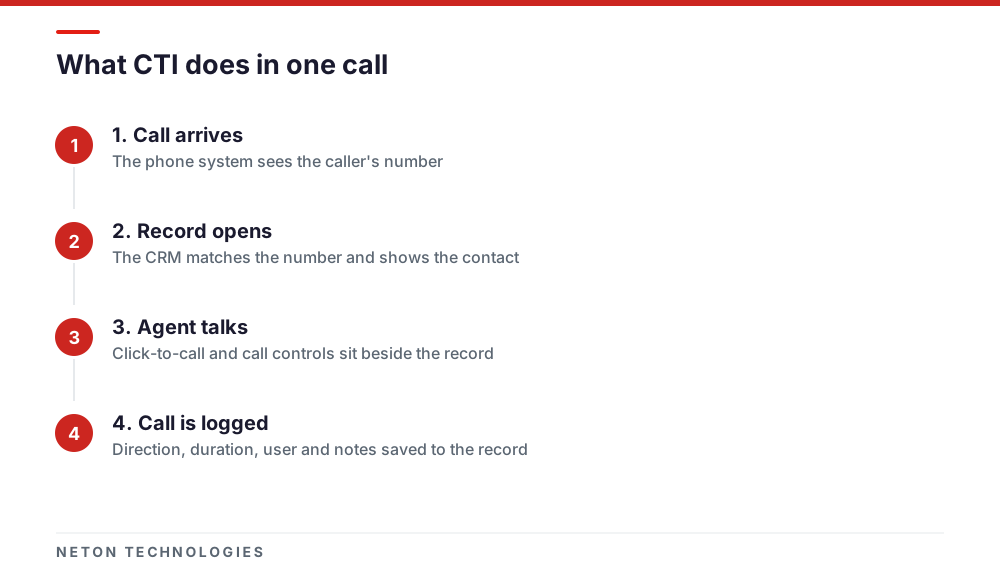
Computer telephony integration (CTI) links your business phone system to your CRM so calls and customer records work together. An incoming call opens the caller's record, a click on a number places the call, and every call is logged to the record automatically, without staff typing anything.
What is CTI (computer telephony integration)?
CTI is the connection between a telephone system and business software. The phone system tells the software who is calling and what is happening on the call. The software tells the phone system who to call and where to send the call.
The most common pairing is a phone system with a CRM, which is the customer database your sales and service teams work in. Without CTI, staff look up a caller by hand, dial numbers by typing them, and write call notes afterwards. With CTI, those steps happen on their own.
CTI is not a phone system and not a CRM. It is the link between them, and it is delivered as an app, an add-on or a configured integration, depending on the CRM.
How does CTI work?
CTI works by passing events and commands between two systems that stay separate.
- The phone system raises an event. A call rings, is answered, is transferred or ends. The event carries the caller's number, the extension and the call direction.
- The CRM looks up the number. It matches the number against contacts, companies or leads, then shows the matching record or offers to create one.
- The CRM can send a command back. When a user clicks a phone number, the CRM asks the phone system to start the call from that user's extension.
- The call result is written to the CRM. Direction, duration, user, outcome and sometimes a recording link are saved as an activity on the record.
The technology underneath varies. Wildix's own pages describe a mix: a native app for HubSpot, Zoho PhoneBridge for Zoho CRM, a TAPI driver for Dynamics 365, and a browser pop-up plus API connection for Odoo. You do not need to know which one your CRM uses, but your integrator does.
The audio does not pass through the CRM. Calls still run over your SIP trunk from e& or du, exactly as before.
What can CTI do for a sales or service team?
Five features cover most of the value. Which ones you get depends on the CRM and the phone system, so check each against the vendor's own list.
- Screen-pop. The caller's record opens as the phone rings. Wildix lists call pop-ups for Salesforce, HubSpot, Zoho CRM and Odoo.
- Click-to-call. Staff click a number in the CRM and the phone system dials it. This removes mistyped numbers and is the feature teams adopt first.
- Automatic call logging. Wildix lists automatic call logging for Zoho CRM and call logs with direction, duration, users and recording file for Odoo. Managers get a call history they can trust because nobody has to remember to write it.
- Recordings and transcripts on the record. The x-bees platform says on its own site that it transcribes calls so they are searchable, and that its Wilma AI assistant writes a brief, customer insights and next steps when a call ends. The same page describes call recordings, transcripts and notes being logged to Salesforce records automatically.
- Routing by CRM data. The CRM can tell the phone system who the account owner is, so a returning customer reaches their own account manager first. This usually needs configuration or custom work rather than a ready-made switch, so ask what your integrator will build and what the vendor lists.
The practical gain is complete CRM data: calls that used to leave no record now leave one.
Which CRMs can connect to a business phone system?
Many major CRMs have a way to connect to a phone system, but the method differs. Some vendors publish a calling framework that phone-system makers build against. HubSpot's Calling Extensions SDK lets apps provide a calling option from a CRM record. Microsoft's Channel Integration Framework integrates telephony providers with Dynamics 365 apps.
For Wildix, the table below summarises what Wildix itself lists on its integration pages. We only describe integrations that Wildix publishes.
The pattern is worth noting. Wildix itself lists a native app for HubSpot and a Zoho PhoneBridge integration for Zoho CRM, while Dynamics 365 and Odoo rely on partner-built connectors. With a partner-built connector, ask who supports it and who updates it when either product changes.
If you use Odoo, our guide to Odoo implementation and AI automation covers the wider system. Wildix's Odoo page says the Sozias integration was built with Wildix's support team, has been live since April 2022, and that its documentation is still marked as in construction. Treat that as a reason to test thoroughly rather than a reason to avoid it.
What is the difference between CTI and native CRM calling?
Native calling means the CRM vendor provides the calling feature itself, or a provider it supports. CTI means you keep your own phone system and connect it to the CRM. Both are valid. The right one depends on who supplies your phone service.
Odoo's VoIP documentation shows the native model. Odoo adds a VoIP widget inside its apps, but it still needs a provider: Odoo names OnSIP and Axivox as verified, and says any other provider must give access to a SIP server over a WebSocket and support WebRTC. Odoo adds that it cannot verify every alternate provider.
- Who supplies the call service. With CTI it is your phone system and your e& or du trunk. With native calling it is the CRM vendor or a provider it supports.
- Phone numbers. With CTI they stay on your existing trunk. With native calling they depend on the provider's coverage.
- Desk phones, queues and reception. With CTI they stay as they are. With native calling they are often limited to what the CRM's calling view offers.
Native calling is simpler if you are starting from nothing and the provider covers your needs. If you already have a phone system, CTI avoids moving your numbers and your reception setup just to add a CRM. UAE numbers come from licensees, so check provider coverage first. TDRA's FAQs say licensees may provide VoIP services and that third parties may do so through a licensee or with TDRA approval.
What do you need for CTI in the UAE?
You need five things, and the first two are usually in place already.
- A phone system that supports integration. A cloud or on-premise system with an API or a vendor-listed connector. Wildix is one,.
- A UAE number source. A SIP trunk from e& or du, ordered against your trade licence. CTI does not replace this.
- A CRM with a supported connector. Check the vendor's list, and check the plan. Wildix lists UC-Business or higher for several of the integrations above, and Salesforce needs a licence with Lightning Platform access.
- Clean contact data. Screen-pop works only if the CRM stores numbers in one format. Mobile numbers saved with and without +971 will not match until cleaned.
- A decision on recordings and personal data. The UAE Personal Data Protection Law has been in force since 2 January 2022. Decide who can open a recording from a CRM record, how long you keep it and how callers are told. Confirm the details with legal counsel for your sector.
Outbound click-to-call makes it easy to call at volume. If the calls are marketing, read our guide to DNCR telemarketing rules before you switch it on for a sales team.
How do you plan a CTI rollout?
Start small, with one team and one CRM, and add features once the basics are reliable.
- List the use cases. Write down what each role needs: receptionists, sales reps, support agents. Rank them. Pop-up and click-to-call usually come first.
- Check the connector against your versions. Confirm your CRM edition, your phone system version and your user plans match the vendor's listed requirements.
- Clean the contact data. Standardise phone number formats and remove obvious duplicates before go-live.
- Map users. Match each CRM user to a phone extension. Wildix says, for Zoho CRM, that you import users from Zoho into the Wildix system and enable the integration on the Wildix side.
- Pilot with five to ten users. Test inbound to a known contact, inbound from an unknown number, click-to-call, transfer, a missed call and a call with a recording.
- Train and roll out. Show staff the three actions they will use daily. Keep the guide to one page.
- Review after a month. Check that logged calls match what staff remember, then add routing by CRM data or AI summaries.
If WhatsApp messages are part of your customer conversations, plan them together with calls. Our guide to WhatsApp and SMS integration covers that side.
How can NETON help with CTI in the UAE?
NETON is a Wildix Gold Partner and an Odoo Certified Partner in Dubai. We can check which connector fits your CRM, configure it, test it against your trunk and train the team. Contact us through the contact page with your CRM and phone system, and we will tell you what is realistic before you commit.
Which CRMs does Wildix list as integrated with its phone system?
| CRM | How Wildix lists the integration | Features Wildix lists | Requirements Wildix lists |
|---|---|---|---|
| Salesforce | Wildix Certified integration; x-bees also advertises a native Salesforce integration | Click-to-call, incoming and outgoing call pop-up, dial pad, contact search, call history | WMS 6.01 or higher, Salesforce licence with Lightning Platform access, Wildix UC-Business or higher |
| HubSpot | Free native app developed by Wildix | Click-to-call from contact or company records, inbound and outbound call pop-ups | None listed on the Wildix page; Wildix describes it as free |
| Zoho CRM | Through Zoho PhoneBridge | Screen pop-ups, click-to-call, follow-up activities after a call, automatic call logging | WMS 4.0 or later, Wildix UC-Business or higher |
| Microsoft Dynamics 365 | Partner add-on (TelephoneIntegration by mscrm-addons.com) using the Wildix TAPI driver | Caller recognition, pop-up, click-to-dial, automatic call activities, record creation, history | The partner add-on and the Wildix TAPI driver |
| Odoo | Partner-certified integration by Sozias | Contact pop-up on incoming call, click-to-call, call history, call logs including recording file | Odoo v12 or above with CRM module, Wi-Service Chrome extension, Wildix UC-Business or UC-Premium |
Frequently asked questions
What does CTI stand for?
CTI stands for computer telephony integration. It means connecting a telephone system to computer software, most often a CRM or helpdesk, so the two exchange call and customer data instead of staff re-typing it between screens.
Is CTI the same as a softphone?
No. A softphone is the calling app. CTI is the link between the phone system and business software. Microsoft makes the same point for Dynamics 365: its Channel Integration Framework is not itself a softphone, it is a framework for integrating one.
Do I need CTI if my CRM already has a built-in dialler?
Not always. Built-in calling suits teams whose phone service comes from the CRM vendor or a provider it supports. In the UAE, where numbers come from e& or du, many offices keep their own phone system and use CTI to connect it to the CRM they already run.
Does CTI change my phone numbers or carrier?
No. CTI sits between the phone system and the CRM. Calls still travel over your existing SIP trunk, and your numbers stay with the carrier. Only the way staff see and start calls changes.
Are call recordings from CTI personal data in the UAE?
A recording of an identifiable person is likely to be personal data under the UAE Personal Data Protection Law, Federal Decree-Law No. 45 of 2021. Limit who can open recordings from the CRM, tell callers they are recorded, and confirm your obligations with legal counsel.
How long does a CTI project take?
It depends on the CRM, how many users you have and how much routing you want. A basic pop-up and click-to-call setup is a small configuration job. Custom routing from CRM data, or an older CRM, takes longer. Your integrator can scope it after a short discovery call.
Sources
- Salesforce Cloud Lightning integration — Wildix — 2026
- HubSpot integration — Wildix — 2026
- HubSpot Integration with x-bees: Admin Guide — Wildix Documentation — 2026
- Zoho integration (Zoho PhoneBridge) — Wildix — 2026
- Microsoft Dynamics CRM integration — Wildix — 2026
- Odoo by Sozias: Wildix integration — Wildix — 2026
- x-bees: AI sales communication platform — Wildix — 2026
- VoIP (Voice over Internet Protocol), Odoo 18.0 documentation — Odoo — 2026
- Calling extensions SDK — HubSpot — 2026
- What is Dynamics 365 Channel Integration Framework 2.0? — Microsoft Learn — 2026
- FAQ about Dynamics 365 Channel Integration Framework — Microsoft Learn — 2026
- Frequently asked questions — TDRA — 2026
- Personal Data Protection Law — UAE Government — 2026
Connecting your phone system to your CRM in the UAE
Phone: +971 4 439 5754 | WhatsApp: +971 4 542 3229
Get a Free Consultation